Choose FLAC when you need to keep the audio samples from a lossless source intact. Choose Ogg Vorbis when you need a smaller playback or delivery file and can accept lossy compression. You do not have to choose one format for every stage: a common approach is to retain a lossless master and create compressed copies for listeners, downloads, or games.
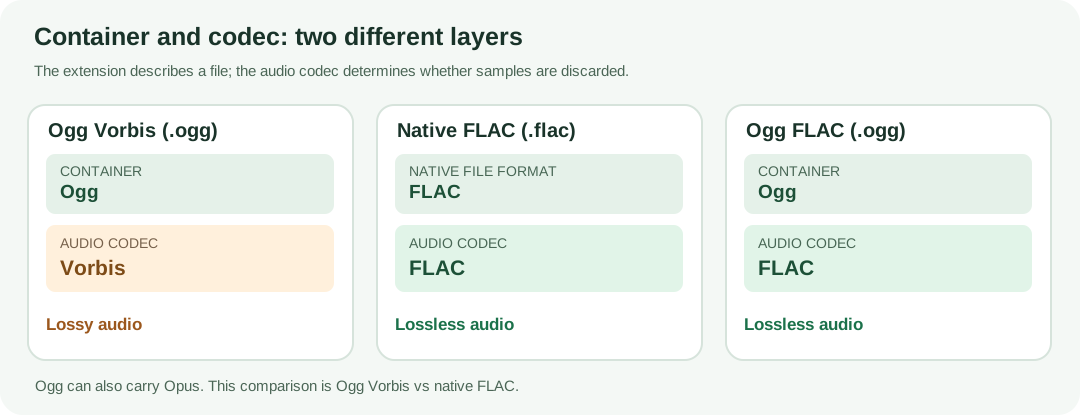
There is one essential qualification. Ogg is a container, not a lossy audio codec. In everyday comparisons, “OGG vs FLAC” usually means Ogg Vorbis (.ogg) versus native FLAC (.flac). That is the comparison here. Ogg can also contain Opus, a different audio codec, or even FLAC itself. The filename extension does not tell the whole story.
Ogg, Vorbis and FLAC: what is actually different?
As Xiph explains, a container organizes compressed media and information needed to play or seek through it. A codec decides how the audio is represented. Think of the container as the package and the codec as the method used to pack its contents.
- Ogg Vorbis: the Ogg container holds audio encoded with the Vorbis codec. Vorbis uses lossy compression, so its decoded samples generally differ from the original. Its quality setting trades file size against retained audio detail.
- Native FLAC: the FLAC codec stores audio using lossless compression within its native file format. With the same supported integer PCM representation and no intervening processing, decoding restores the original sample values.
- Ogg FLAC: the Ogg container holds FLAC-coded audio. This is lossless too, but it is not the usual Ogg Vorbis file. More on this exception below.
If you want a deeper explanation of the extension, see what an OGG file contains.
OGG vs FLAC at a glance
| Question | Ogg Vorbis (.ogg) | Native FLAC (.flac) |
|---|---|---|
| Is audio compression lossless? | No; Vorbis is lossy. | Yes; the FLAC codec is lossless. |
| Main purpose | Smaller distribution and playback copies. | Lossless storage, transfer and source preservation. |
| File size | Often much smaller at useful listening settings. | Usually larger than a lossy delivery file, but often smaller than uncompressed PCM. |
| How is size controlled? | Encoder quality or bitrate settings; commonly variable bitrate. | Compression settings and compressibility of the signal; no audio information is discarded. |
| Can decoding recover the source PCM exactly? | Not generally. | Yes, for the samples encoded, without changing sample format or applying processing. |
| Editing or repeated export | Keep the lossless original if possible; repeated lossy encoding may add changes. | Suitable as a source for later exports without codec-induced audio loss. |
| Compatibility | Depends on whether the device or software understands both Ogg and Vorbis. | Depends on native FLAC support; do not assume every player or delivery platform accepts it. |
| Metadata | Vorbis comments are supported; preservation depends on the software. | FLAC supports tags and other metadata; converting a whole file does not guarantee every original container-specific metadata item survives. |
Does FLAC sound better than OGG?
FLAC has a stronger preservation guarantee, not a guarantee that you will hear a difference. Given lossless PCM input, the FLAC decoder can reconstruct the sample values exactly, as defined by the FLAC specification. Vorbis encoding changes the representation by discarding information judged less important to perception. At a suitable setting, that change may be difficult or impossible for a particular listener to notice on a particular recording. On other material or at other settings, differences may be apparent.
No universal bitrate makes Vorbis “equivalent” to FLAC. File size and perceived quality vary with the recording, encoder, settings, playback conditions and listener. A high Vorbis quality setting still does not turn it into lossless encoding. Conversely, a badly recorded or already lossy source does not become a better recording just because you save it as FLAC.
When preservation is the requirement—perhaps an original recording, a purchased lossless download, or a project you will revisit—use a lossless master. When bandwidth or package size matters and listeners only need a playback copy, test a Vorbis setting against your actual material.
Measured example: two sources, three file formats
To show how compression changes with content, we generated two original 12-second synthetic stereo signals, each at 48,000 samples per second and 16 bits per sample. One consists of changing harmonics and short tones; the other is pseudorandom noise. Neither is a representative music recording, and no listening-quality claims come from these tests.
Both WAV sources contain 2,304,000 bytes of PCM audio, plus 44 bytes of WAV header. We encoded each with FFmpeg 7.1.5, using native FLAC at -compression_level 8 and Ogg Vorbis through libvorbis at -q:a 5.
| Original 12-second source | PCM WAV | Native FLAC | Ogg Vorbis |
|---|---|---|---|
| Changing tones and harmonics | 2,304,044 bytes | 466,984 bytes | 79,990 bytes |
| Pseudorandom noise | 2,304,044 bytes | 2,164,094 bytes | 254,498 bytes |
The same settings produced very different results. The tonal signal was easier for FLAC to compress than the noise signal. Vorbis also varied in size despite the identical duration, channels and quality setting. This is why “a FLAC is always X times larger” is not a dependable rule.
For the tonal example, total file-size averages were about 311.3 kbps for FLAC and 53.3 kbps for Vorbis. These are measured file-average bitrates, including container and metadata overhead; they are not target bitrates or sound-quality scores. A different source could yield entirely different numbers at the same encoder settings.
We also decoded both FLAC files to matching signed 16-bit stereo PCM and compared their sample bytes with the originals. Both matched exactly. That verifies lossless preservation in this particular setup; it says nothing about how good the generated tones sound. Vorbis is not expected to reproduce those same PCM bytes, and a differing hash would not tell us whether a difference is audible.
Which format should you keep as your master?
If you have a genuine lossless source and might edit, remaster or export it later, keep that source or a verified lossless copy. Native FLAC is a useful way to store integer PCM audio without throwing away audio sample information, while reducing storage when the signal is compressible. Some editing programs prefer an uncompressed PCM WAV working file; that can be a convenient interchange or editing format without making Vorbis your new master.
A practical workflow is:
- Capture or obtain the best available source. Keep the original file, its sample rate and bit depth information, and any important project metadata.
- Preserve a lossless version. Where appropriate, store a native FLAC archive or retain a lossless PCM master. Verify important files and keep backups.
- Edit from the lossless source. If the editor wants WAV, decode to PCM WAV without unnecessary resampling, channel changes or reduced bit depth.
- Create distribution copies. Export Ogg Vorbis, or another format your target platform requests, from the lossless master. Judge the result using your own representative audio.
- Return to the master for later exports. Do not make each new lossy deliverable from an older lossy deliverable if the original remains available.
Have a compatible PCM WAV ready for an Ogg Vorbis delivery copy? Use the WAV to OGG converter for supported WAV input. If you need editable PCM from a supported Ogg audio file, the OGG to WAV converter can create a working copy—but it cannot reverse earlier lossy encoding. Check the tool's supported codecs and output sample format before relying on it for a particular workflow.
Why converting lossy OGG to FLAC does not restore quality
Suppose the only file you have is Ogg Vorbis. The Vorbis decoder reconstructs a playable audio signal, but the information the encoder previously discarded is no longer available. Saving that decoded signal as FLAC can protect that decoded representation from further lossless-codec changes. It cannot recover an earlier PCM master that no longer exists.
We checked this with our synthetic tonal file. The 79,990-byte Vorbis file was decoded to 48 kHz, stereo, 16-bit PCM and saved as a 469,153-byte FLAC file. Decoding the new FLAC recovered exactly the PCM that came from the Vorbis decoder. It did not recover the original pre-Vorbis PCM. The larger file is not evidence of improved sound.
The same principle applies to increasing the bitrate of a previously compressed file: a bigger output may reduce additional encoding damage in a new lossy export, but it cannot recreate missing original audio information. Converting directly between lossy codecs can introduce additional changes; whenever possible, start again from the lossless original.
What about Ogg FLAC?
The Ogg container can carry FLAC audio instead of Vorbis. This is called Ogg FLAC. It remains lossless because the codec is FLAC, regardless of the .ogg container. Xiph's Ogg FLAC mapping specifies how this compressed audio is packaged.
That exception matters when checking tools or players. An app that opens Ogg Vorbis or Ogg Opus may not accept Ogg FLAC, even though all three can use an Ogg container. For an ordinary lossless music library or archive, native `.flac` is generally the simpler compatibility choice unless a specific workflow calls for Ogg FLAC.
Playback, web audio and game assets
For personal listening: choose FLAC if you value retaining a lossless library and have adequate space. Use a compressed copy if storage, transfers or a particular device make that more convenient. The source and playback chain matter more than the filename alone.
For audio editing: keep the master lossless. Decode to a supported PCM format when required, then export delivery files when the work is finished. Avoid lossy-to-lossy handoffs across multiple editing passes.
For websites: verify container plus codec, MIME type and browser support, and provide an alternative format when the audience needs it. The MDN container guide documents Ogg audio codecs and notes that Safari 18.4 and later added Ogg Vorbis and Opus support on specified Apple OS versions. That does not guarantee older browsers, embedded webviews or every device will play your file.
For game audio: follow the game engine's import and build requirements rather than assuming .ogg will work everywhere. Compressed music assets can help distribution size; short effects and repeatedly processed assets may benefit from a lossless source. Measure the actual game build and test playback on target platforms.
Frequently asked questions
Is every OGG file lossy?
No. Ogg Vorbis and Ogg Opus are lossy, but an Ogg container can also hold lossless FLAC. Inspect the audio codec, not just the .ogg extension.
Does changing FLAC compression level change sound quality?
No, provided the file is correctly encoded and decoded without other processing. FLAC compression settings can change compressed file size and encoding effort; they do not intentionally discard PCM sample information.
Should I convert an existing OGG collection to FLAC?
Usually not merely to improve quality: converting lossy Ogg Vorbis to FLAC cannot recover what was lost. A FLAC copy may suit a special editing or preservation workflow, but keep the original Vorbis file too if it matters, and expect the copy to use more space.
Can I rename `.ogg` to `.flac`?
No. A filename change does not convert its codec or container. Use a tool that understands the input stream and can produce the output format you need.