
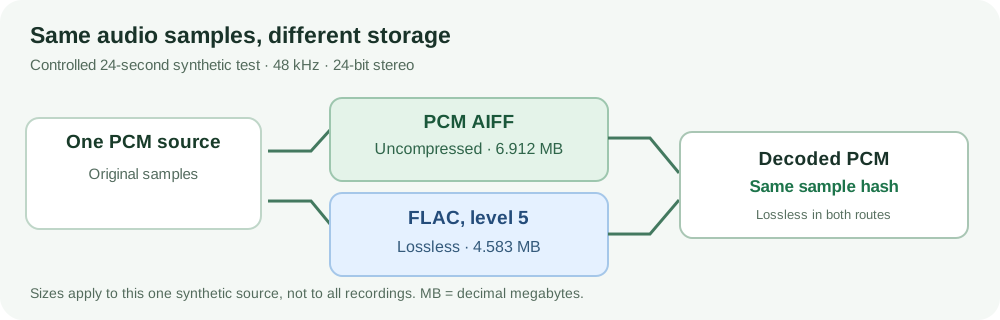
FLAC is usually the more space-efficient choice for a lossless music library or an archive that needs smaller files. Conventional PCM AIFF is useful when a recording, editing application, or delivery specification calls for an uncompressed audio file. Neither has inherently better sound quality. If both decode to the same samples at the same sample rate, bit depth, and channel arrangement, the audio data is identical.
The decision is about storage, metadata, and software compatibility. Here is the comparison, including a test of decoded samples.
FLAC vs AIFF at a glance
| Question | FLAC | Conventional PCM AIFF |
|---|---|---|
| How is audio stored? | Reversibly compressed PCM samples | Uncompressed PCM samples inside an AIFF file |
| Does it discard audio information? | No, for a lossless conversion of compatible PCM | No, when the PCM is written without changing its properties |
| File size | Often smaller; savings depend on the signal and encoder settings | Predictable from sample rate, bit depth, channels, and duration, plus a small header |
| Tags and artwork | Native Vorbis-comment fields and optional picture blocks; app support still varies | Chunk-based metadata; which tags and artwork an app reads or writes varies |
| Editing | Works where the editor imports FLAC; it must decode the audio first | Convenient when a workflow requests an uncompressed interchange file |
| Best fit | Lossless listening copies, many music libraries, and compact archival audio | PCM interchange, specified handoffs, and some editing workflows |
Scope: “AIFF” below means ordinary uncompressed PCM AIFF. The related AIFF-C/AIFC family can contain compressed audio, so a filename alone does not prove that a file stores uncompressed PCM.
Why smaller FLAC files can contain the same audio
PCM audio stores numerical samples for each channel. Sample rate counts samples per second; bit depth describes each integer sample’s precision. A stereo 48 kHz/24-bit recording has two channels, each containing 48,000 24-bit samples per second.
PCM AIFF stores those values without audio compression. FLAC looks for predictable patterns and stores the information more compactly, together with what is needed to reconstruct the exact original sample values. This is lossless compression, not the information-discarding compression used by codecs such as MP3. The FLAC specification (RFC 9639) defines how that reconstruction works.
A 24-bit FLAC is not lower-resolution because it uses fewer bytes. Compression level changes encoding effort, not audio quality. Actual savings vary: silence, tonal passages, and complex noise compress differently.
An original matched-source test: AIFF and FLAC
In a controlled test, we generated 24 seconds of original synthetic stereo PCM at 48 kHz/24-bit, combining tones, transients, noise, and silence. From the same WAV source we made PCM AIFF and three FLAC files, without processing or changing audio properties.
| File generated from the same source | Measured size (decimal MB) | Measured size (binary MiB) |
|---|---|---|
| PCM AIFF | 6.912 MB | 6.592 MiB |
| FLAC, compression level 0 | 4.783 MB | 4.562 MiB |
| FLAC, compression level 5 | 4.583 MB | 4.371 MiB |
| FLAC, compression level 8 | 4.564 MB | 4.353 MiB |
Result: All five files, including the source WAV, decoded to the same SHA-256 hash of normalized 32-bit little-endian PCM. The audio samples matched; the file bytes and metadata need not.
The test used FFmpeg/ffprobe 7.1.5 and checked FLAC integrity with flac 1.5.0. Reproduction commands and exact hashes are in the evidence package.
Limitation: This synthetic signal includes easy-to-compress passages. Its sizes cannot predict savings for music collections. We did not measure speed or conduct listening tests.
Can FLAC and AIFF sound different?
Not from compression alone. With identical decoded samples, channel order, sample rate, and playback processing, the formats deliver identical digital audio.
Differences can arise from replay gain, equalization, volume, resampling, or output-device settings. Conversion can also change bit depth, channel mapping, or length, or apply dithering. Corrupt files and software bugs are possible. None creates an inherent “FLAC sound” or “AIFF sound.”
There is an important source-quality limit, too: converting a lossy recording to either FLAC or AIFF preserves the already-decoded audio; it cannot restore information discarded by the earlier lossy encode. Similarly, changing a 16-bit source into a 24-bit container does not create new recorded detail.
If you hear a difference, check the PCM and playback settings before blaming the file format.
Storage, editing, and master-file decisions
For a collection of finished recordings, FLAC saves storage and transfer space when recipients can decode it. A trustworthy archive still needs backup copies, checksum checks, and descriptive information.
AIFF is useful when uncompressed PCM is requested. For stereo 48 kHz/24-bit, raw samples occupy 48,000 × 2 × 3 = 288,000 bytes per second, or 17.28 decimal MB per minute, plus small headers. This makes storage predictable.
A compatible editor decodes FLAC without inherently degrading it, but programs differ in import, caching, and export behavior. For shared takes or stems, follow the recipient’s specified format, sample rate, bit depth, and channel layout. Neither Mac nor Windows dictates the choice.
Neither audio file replaces the native project/session, which may hold plugins, automation, markers, and multitrack edits. Keep it for later changes.
Which applications actually support them?
Check the program and version: FLAC working in one app does not prove support in another.
- FFmpeg 7.1.5: In the accompanying reproducible test, this exact build read a 24-bit WAV and wrote and decoded 24-bit PCM AIFF and FLAC successfully. That establishes the tested command-line workflow, not compatibility with every GUI application.
- Audacity 3.7: The official Audacity 3.7 reference manual documents importing most PCM AIFF files and FLAC files. It also explains that audio is imported into an Audacity project. The documentation is versioned; behavior in newer releases should be checked rather than assumed.
- Apple Music on Mac: Apple's Music guide documents AIFF as a format in its music-conversion workflow. This is not evidence that Music imports FLAC. If your goal is a particular Music library, verify its supported source formats and test an actual file before converting a collection.
For handoffs, confirm the file opens with the right duration, channels, and required metadata.
What survives FLAC–AIFF conversion?
It helps to think of a recording as three layers:
- The audio samples. A correctly configured lossless conversion between compatible PCM and FLAC can preserve these exactly. Match sample rate, channels, channel order, and bit depth. Verify rather than assume if preservation is critical.
- Descriptive information. Title, artist, album, track number, artwork, and notes are separate from the samples. FLAC defines Vorbis-comment metadata and optional picture blocks. AIFF can carry metadata in chunks, but tag conventions and application support are not identical. A converter may omit, rename, or reinterpret fields.
- Workflow-specific data. Loop points, markers, time references, custom chunks, editing history, and DAW project information may have no reliable equivalent in the destination file. Even an audio-perfect conversion can leave them behind.
Before deleting a source, check duration, rate, depth, channels, boundaries, and preferably decoded PCM. Inspect tags and artwork in the receiving app. Keep the original until verification passes.
Which should you choose?
Choose FLAC if you're storing finished lossless recordings, maintaining a supported music library, or transferring audio where smaller files help and lossless decoding is available. Retain accompanying documentation and validate backups.
Choose PCM AIFF if an editor, engineer, client, or ingest system specifically asks for it, or if you want an uncompressed interchange copy with clearly agreed PCM parameters. This is a workflow choice, not an upgrade in audible fidelity.
Keep the native session plus an agreed lossless export when a project must remain editable. If you also need a small listening or web-delivery copy, produce it separately from that lossless source; do not confuse delivery compression with the quality of your stored master.
If you already have one of these formats and the recipient supports it, there may be no reason to convert at all. Conversion is justified by a concrete compatibility or delivery requirement, not by a blanket rule about which extension sounds better.
FAQ
Is FLAC lower quality than AIFF because it is compressed?
No. FLAC is losslessly compressed. When its decoded PCM matches the PCM in an AIFF file, the audio samples are identical. Lossy encoding and sample-format changes are different operations.
Is AIFF always larger than FLAC?
Conventional uncompressed PCM AIFF usually takes more space for the same audio properties, but the size advantage of FLAC depends on the signal, encoder, and metadata. Do not assume a fixed savings percentage for every recording.
Does changing FLAC compression from level 0 to 8 improve sound?
No. Levels change encoding effort and typically file size, not the decoded samples. In our test, levels 0, 5, and 8 all produced the same normalized PCM hash.
Can I convert FLAC to AIFF and back without quality loss?
Yes, for compatible PCM, if the conversion keeps the sample properties intact and uses no processing that changes samples. The files and metadata may still differ, so verify both the decoded audio and the tags you need.
Which is better for a long-term master?
Choose according to your archive requirements and supported software. FLAC is practical for a compact, verifiable lossless audio copy; PCM AIFF may be required for an uncompressed deliverable. For an editable production master, keep the native project and its supporting assets as well.